Modern .NET Development
Handling File Downloads Correctly with Refit and ASP.NET Core
A file download is a streaming, ownership and security contract-not merely an endpoint that returns a byte array. The differences appear with large files, cancellation, range requests and error bodies.
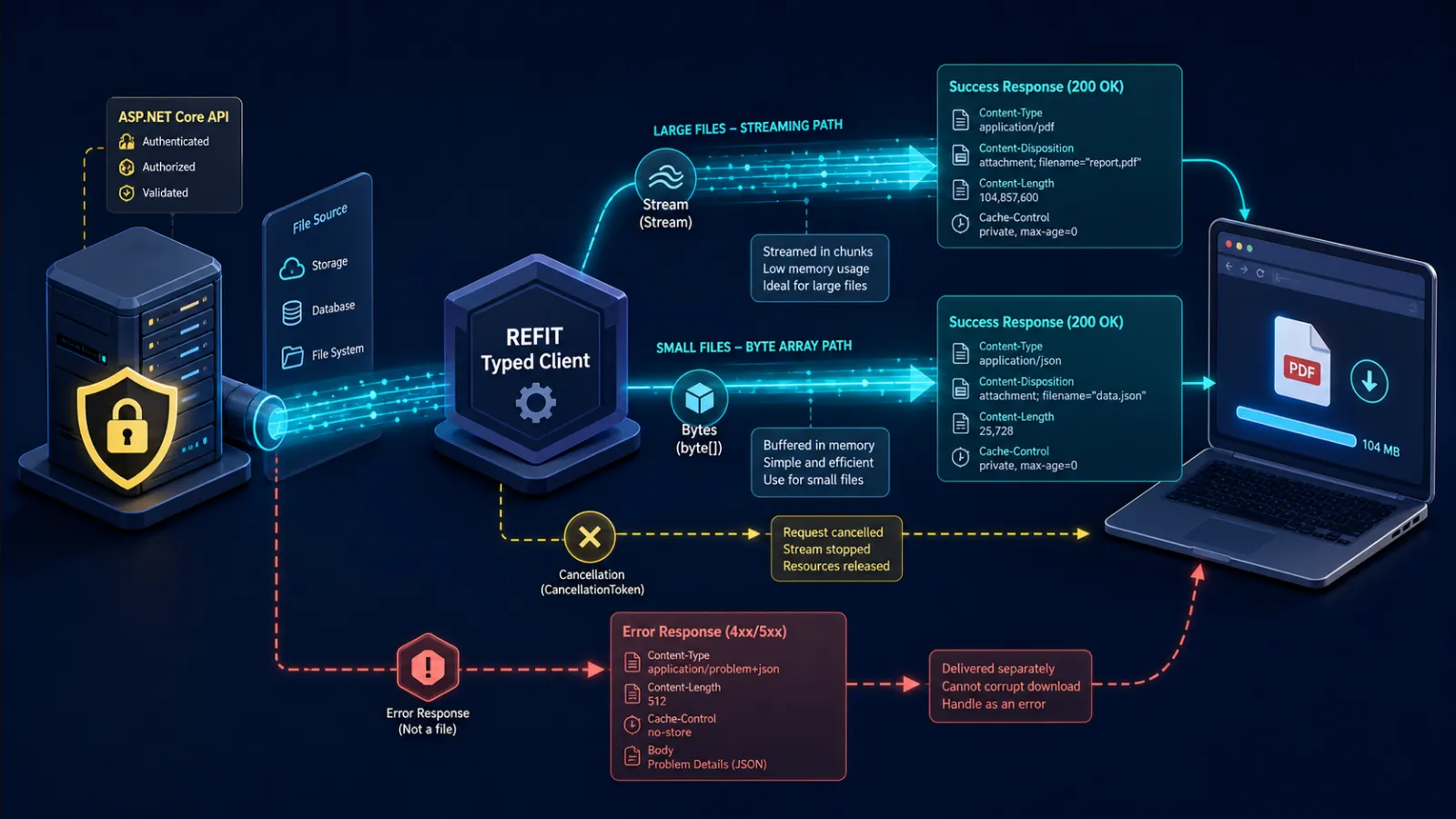
Byte arrays are convenient until traffic becomes real
Returning byte[] from an ASP.NET Core endpoint and from a Refit client appears correct in a small test. The server may buffer the entire file, the client may buffer it again and application code may create another copy before writing it. Ten concurrent 200 MB downloads can turn a modest API into a memory-pressure incident.
Choose buffering only when files have a small enforced maximum and the operation genuinely needs all bytes in memory. For arbitrary or large content, stream from storage to the HTTP response and from the HTTP response to the final destination. Streaming controls peak memory; it does not make storage or network bandwidth free.
The contract includes more than the body
| Concern | Contract decision |
|---|---|
| Media type | Authoritative Content-Type, with safe fallback |
| Filename | Content-Disposition, sanitised by the receiver |
| Size | Content-Length when known; never trust it as a security guarantee |
| Resume | Range requests, validators and 206 behaviour |
| Integrity | Trusted metadata or digest when the workflow requires it |
| Failure | Problem Details rather than binary content |
| Lifetime | Cancellation, timeout and disposal ownership |
A client that reads only the body cannot distinguish a PDF from a JSON error saved with a .pdf extension. Inspect status and headers before copying.

Stream from the source, not from a hidden buffer
ASP.NET Core file results can write a stream to the response and can support range processing where the underlying source is seekable and the semantics are correct. A stream returned by an object-storage SDK may already be network-backed. Copying it into a MemoryStream before returning defeats the design.
Open the source as late as practical and dispose it after the response completes. Do not dispose it before ASP.NET Core has consumed it. When writing directly to HttpResponse.Body, handle cancellation and failure carefully because headers may already have been sent; once body transmission begins, a neat Problem Details replacement may be impossible.
Buffering to a temporary file can be the right trade-off when the source is non-repeatable, content length must be known, antivirus scanning is required or clients need range support. “Streaming” is not automatically superior; the goal is bounded resources and explicit lifecycle.
Refit needs access to the response lifetime
A Refit method that returns Stream looks attractive, but callers also need status, headers and clear disposal ownership. A response-oriented return type allows the adapter to inspect success and content metadata before opening the body. The response must remain alive until copying finishes.
public async Task DownloadAsync(
    Guid documentId,
    Stream destination,
    CancellationToken cancellationToken)
{
    using var response = await _documents.GetFileAsync(documentId, cancellationToken);

    if (!response.IsSuccessStatusCode)
        throw await MapFailureAsync(response, cancellationToken);

    await using var source = await response.Content
        .ReadAsStreamAsync(cancellationToken);

    await source.CopyToAsync(destination, cancellationToken);
}
The exact Refit response type varies with the chosen interface, but the ownership rule does not: whoever receives the response disposes it after the stream is consumed. Returning a stream beyond that scope requires a wrapper that owns both.
Content-Disposition is untrusted input
The server may provide filename and RFC-compatible encoded filename* values. A receiving service must remove path segments, reserved device names, control characters and invalid filesystem characters. Never combine an untrusted filename directly with a download directory; ../../ is not a filing instruction.
The extension is not proof of content type, and Content-Type is not proof that content is safe. If files originated from users or external systems, apply malware scanning and content policy at the appropriate boundary. Serve active formats with conservative browser headers and from a domain or storage boundary that limits script execution risk.
Range support changes correctness
Range requests allow media seeking and resuming interrupted downloads. A valid partial response uses 206 and Content-Range; an unsatisfiable range uses 416. The source must support stable random access, and the representation must not change silently between chunks.
Use ETags or last-modified validators with range requests so a resumed download cannot combine bytes from two versions. Do not advertise Accept-Ranges merely because middleware can parse the header. Generating a report on demand may not be repeatable byte-for-byte and may be better exposed as an asynchronous job whose completed immutable artifact supports ranges.
Browser downloads have a separate security model
For same-site browser applications, a normal authenticated navigation to a download endpoint often works better than fetching all bytes through JavaScript. The browser handles streaming and Content-Disposition without holding the file in JS memory. If JavaScript must fetch cross-origin content, CORS must expose headers such as Content-Disposition that code needs to read.
Authorise the exact document and tenant immediately before streaming. A signed URL delegates access to whoever possesses it until expiry; keep scope and lifetime narrow, avoid placing it in logs, and understand that revocation may not be immediate. Do not treat an unguessable identifier as authorisation.
Timeouts and retries can corrupt the user experience
A timeout for a large download must reflect expected size and network conditions rather than a generic short API timeout. Prefer cancellation controlled by the user journey and monitor stalled transfer separately from total duration.
Retrying after partial output needs a new file or a verified range resume. Blindly appending a fresh 200 response to a partial file corrupts it. Write to a temporary destination, validate completion or integrity, then atomically expose the final name. Clean abandoned temporary files with a bounded retention process.
Do not proxy large files without a reason
If the API only authorises a blob already held in object storage, a short-lived signed download URL can move bytes directly from storage or CDN to the client. This reduces application bandwidth and connection duration. Proxy through ASP.NET Core when audit, transformation, network isolation, consistent policy or concealment of storage topology justifies the cost.
Whichever path is chosen, record download authorisation and outcome without logging sensitive URL signatures. A response beginning successfully does not prove the user received every byte; distinguish initiated, completed where observable, cancelled and failed transfers.
Production checklist
- Enforce a small maximum before choosing byte arrays.
- Stream source to destination with cancellation.
- Keep the HTTP response alive until the body stream is consumed.
- Inspect status and media type before saving content.
- Sanitise filenames and do not trust extensions.
- Authorise the resource and tenant, not merely the route.
- Support ranges only for stable, seekable representations.
- Use temporary files and verified completion for retries.
- Load-test concurrent large transfers and memory.
- Prefer direct object-storage delivery when proxying adds no value.
Related C3 Software guides
Frequently asked questions
Should a Refit download return byte[] or Stream?
Use byte arrays only for small bounded files. Stream larger content and retain access to response status and headers.
Who disposes a downloaded stream?
The adapter or caller that receives the HTTP response owns disposal and must keep it alive until the stream is fully consumed.
Should ASP.NET Core proxy files from Blob Storage?
Only when it adds policy, transformation, audit or isolation value. Otherwise a narrow short-lived signed URL can avoid tying up application bandwidth.
Can a failed download be retried safely?
Yes from the beginning into a fresh temporary file, or by a validated range resume. Never append an unverified full response to partial content.
Make file delivery reliable at production scale
C3 Software Limited has built and supported business software in the UK since 2001. If downloads are consuming memory or failing unpredictably, talk to C3 Software about an API and storage review.