Modern .NET Development
Migrating an ASP.NET MVC Application to Modern .NET
Migrating ASP.NET MVC is not a namespace conversion. The real work is replacing System.Web assumptions, preserving business behaviour and deciding which legacy dependencies deserve a bridge-and which should end at the migration boundary.
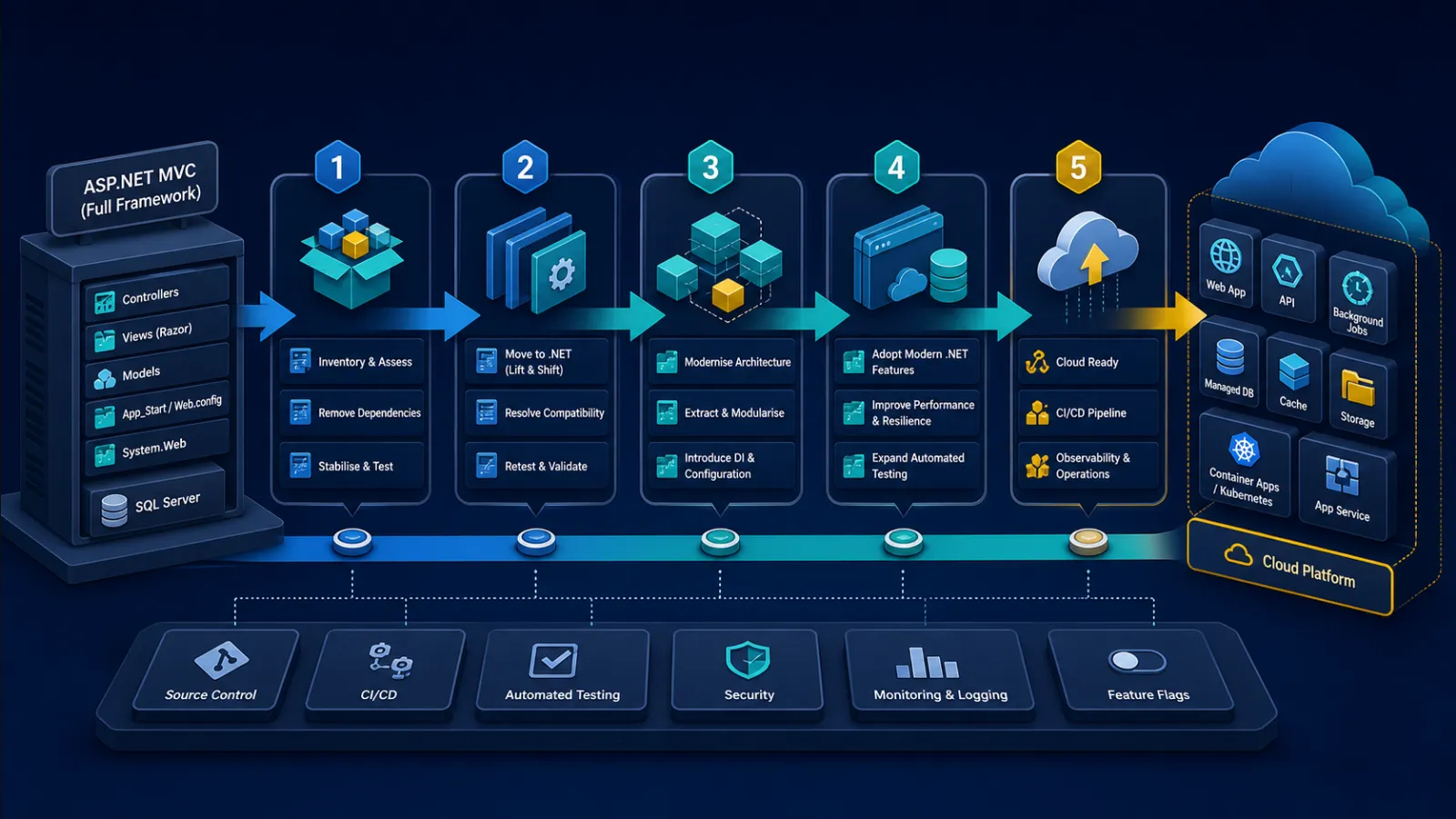
A successful build is the beginning, not the end
An ASP.NET MVC 5 application and an ASP.NET Core MVC application can look deceptively similar. Both have controllers, actions, Razor views and model binding. Underneath, their hosting, request pipelines, configuration, dependency injection, authentication and session models are different.
Mechanical tooling can convert project files and identify incompatible APIs. It cannot tell whether an HttpModule performs a security check, whether a session value coordinates a multi-page workflow or whether a custom model binder encodes a business convention. Those behaviours often compile only after being redesigned.
Define the migration outcome first. Common drivers include leaving an unsupported dependency, enabling Linux or container hosting, improving deployment safety, adopting current security features or reducing change cost. If the goal is only “run on modern .NET”, the team may reproduce every legacy constraint in a new runtime.
Choose a supported target deliberately
As of July 2026, .NET 10 is the active Long Term Support release. A production migration should target a release whose support window fits the programme and expected launch date, then remain current with servicing patches. Do not spend a long migration landing on a runtime near end of support.
The target framework is only one lifecycle. Inventory database drivers, authentication libraries, reporting engines, PDF tools, frontend packages, build agents and hosting operating systems. A supported runtime does not make an abandoned package safe.
Avoid targeting an old ASP.NET Core version on .NET Framework as a stepping stone. That retains the Framework dependency while adopting an obsolete web stack. Modern incremental migration uses separate Framework and ASP.NET Core applications with an explicit routing boundary.

Build an incompatibility map before estimating
Search the solution for System.Web, HttpContext.Current, HttpApplication, modules, handlers, session, cache, machine keys, Server.MapPath, HostingEnvironment and static service locators. These identify framework coupling, but repository search is not enough.
Record runtime dependencies: IIS configuration, Windows authentication, registry access, COM components, local file writes, fonts, certificates, scheduled tasks and network shares. Inspect production traffic and database access for endpoints and jobs that documentation misses.
Classify each dependency:
- Portable: already targets .NET Standard or modern .NET and has no Framework-only behaviour.
- Upgradeable: a supported package or API replacement exists.
- Adaptable: isolate it behind an interface or remote boundary temporarily.
- Replaceable: its behaviour is valuable but the implementation is not.
- Retirable: evidence shows it is unused or no longer required.
The last category matters. Migration is an opportunity to delete, not a requirement to port every historical feature.
Capture behaviour before changing the framework
Add characterisation tests around valuable routes, generated files, validation behaviour, redirects, status codes and database effects. Label odd behaviour as required, defective or unknown rather than automatically preserving it.
Contract details frequently break clients: JSON property casing, null omission, date formatting, enum representation, query-string parsing and error bodies. ASP.NET Core may choose different defaults from older formatters and binders. Snapshot representative payloads, but assert important semantics explicitly.
Use browser tests sparingly for critical journeys such as sign-in, checkout or case submission. Integration tests should exercise routing, filters, model binding and persistence against realistic dependencies. Unit tests alone cannot prove that framework wiring survived.
Baseline latency, error rates, resource use and background-job duration too. Functional equivalence with a severe performance regression is not a safe cutover.
Separate business code before moving web code
Controllers that access HttpContext, Entity Framework, email and file storage directly are expensive to port because framework and business decisions are interleaved. Extract business rules into ordinary services with explicit inputs and outputs while the application still runs on .NET Framework.
Multi-target a library only when its dependency surface genuinely supports both runtimes. Conditional compilation scattered through domain code is a warning that the boundary is wrong. Often a small Framework adapter and a clean modern contract are easier to retire.
Do not introduce interfaces around every class. Add seams around framework state, external systems, time, file access and capabilities that must differ during coexistence. The goal is testable ownership, not an abstraction count.
System.Web was an ambient runtime; ASP.NET Core is explicit
ASP.NET Framework made request state globally reachable through HttpContext.Current. ASP.NET Core passes HttpContext through the pipeline and exposes it to components that genuinely need request concerns. Business services should receive the user, tenant or correlation information they require rather than pulling an entire HTTP context from an accessor.
HttpModule and HttpHandler behaviour becomes middleware, endpoint filters, authentication handlers or endpoints depending on purpose. Middleware order is part of correctness: exception handling, forwarded headers, static files, routing, authentication and authorisation do not commute.
Application_Start is replaced by host construction and service registration. Application shutdown remains best-effort; do not rely on it to complete durable work. Put important background work in a hosted service with durable state or an external worker and design for interruption.
Configuration migration is a semantic change
web.config application settings usually move into configuration providers, but copying keys into appsettings.json is not the design. Separate non-secret configuration, secrets and product data. Use environment or managed secret providers appropriately and validate required settings at startup.
Bind related settings to typed options. Decide whether a value is fixed for the process, reloadable or tenant-specific. Silent fallback defaults can make a missing production setting look like valid behaviour.
IIS settings do not all translate into application configuration. Request limits, proxy headers, TLS termination and authentication may be split across Kestrel, IIS, a container platform and an ingress. Document which layer owns each control and test the deployed topology, not only local Kestrel.
Authentication continuity is not authorisation equivalence
During phased migration, users should not be forced to sign in again as routes move. Depending on the existing stack, applications can share compatible cookie authentication or the ASP.NET Core application can delegate authentication to the Framework application through System.Web adapters. Remote authentication is a bridge: it adds a network dependency to identity resolution and should have monitoring and a retirement plan.
Do not assume that deserialising the same identity reproduces access decisions. MVC authorization filters, custom principals, role providers and action code may all contribute rules. Inventory actual decisions and express them as ASP.NET Core policies, including tenant, resource ownership and record state.
Cookie names, domains, paths, data-protection keys and application names must align for cookie sharing. SameSite and secure-cookie behaviour can differ behind proxies. Test sign-in, sign-out, expiry, renewal, password or role changes and cross-application redirects.
Never convert a server-side session into an unsigned client claim merely to avoid migration work. Authentication proves identity; mutable workflow and authorisation state need their own authoritative source.
Session is where incremental migrations become coupled
Classic ASP.NET applications often store serialised objects or workflow state in session. ASP.NET Core session is deliberately simpler and does not make those object graphs portable. Sharing a session identifier does not solve incompatible serialization, key semantics or concurrent updates.
First ask whether the state belongs in session. Basket, application or case state that must survive devices, deployments or support intervention often belongs in a database. Keep only short-lived presentation state in session.
System.Web adapters can provide remote session during coexistence, but every access can bind the new application to the old application's availability and latency. Move individual session keys to durable stores, make ownership explicit and measure remaining remote use. Avoid a big-bang session rewrite hidden inside the final cutover.
Razor views port; assumptions around them often do not
Razor syntax is familiar, but helpers, child actions, bundling, custom view engines and Html.Action do not map directly. Replace child actions with view components or partials according to whether they own behaviour. Move asset building to a maintained frontend pipeline or explicit static assets.
Do not combine framework migration with a complete frontend rewrite unless the UI itself is the constraint. ASP.NET Core MVC or Razor Pages can preserve server-rendered behaviour and reduce the number of simultaneous unknowns. Blazor or a client-side application is a product and architecture decision, not a required destination for modern .NET.
Retest encoding and validation. Raw HTML helpers, custom templates and unobtrusive validation may behave differently. A view that renders correctly can still have lost antiforgery protection or client-side error handling.
Data access should move independently where possible
Entity Framework 6 can be a useful bridge when a full EF Core migration would overload the programme. EF Core is not a drop-in runtime upgrade: query translation, lazy loading, conventions, migrations and transaction behaviour require evaluation.
Capture generated SQL and performance for important queries. A LINQ query that returns the same rows can still issue many more round trips or move evaluation into memory. Test concurrency conflicts and transaction boundaries, not only reads.
Do not let both applications introduce schema changes without coordination. Use expand-and-contract changes: add compatible schema, deploy readers and writers, migrate data, then remove obsolete columns after evidence shows no old consumer remains.
A shared database may be acceptable during web migration, but it preserves coupling. State whether database separation is part of this programme or a later one so the temporary choice is not mistaken for the target architecture.
Incremental routing needs one public front door
For a large application, place ASP.NET Core in front and proxy unmigrated routes to the Framework application. Move coherent endpoint groups behind explicit routing rules. Users and external clients retain one origin while implementation ownership changes.
Forwarded headers, scheme, host, path base, cookies and correlation identifiers must survive the proxy. An incorrect external scheme can produce insecure redirects; a mismatched virtual directory can break URL generation and authentication. System.Web adapter remote-app scenarios require compatible virtual-directory layouts.
Observe which application served each request. Route-level metrics and traces are essential for rollout and for proving that legacy endpoints are unused before removal. A fallback proxy can hide missing migrations indefinitely if every unexpected route simply continues to work.
Deployment behaviour changes even when the code does not
ASP.NET Core is a console application hosted behind a server or reverse proxy, not an IIS application loaded into the classic ASP.NET runtime. File paths, process identity, shutdown, environment variables and stdout logging therefore differ.
Keep application instances stateless where practical. Local uploads, in-memory cache and scheduled work can fail when instances scale or restart. Use shared durable services where the business requires continuity, while preserving tenant and access boundaries.
Expose liveness and readiness separately. An application can be alive but unable to serve because configuration, database connectivity or a required migration is missing. Avoid readiness checks that overload dependencies or make every optional integration block all traffic.
Test rollback with database compatibility and shared cookies. Redeploying the old binary is not a rollback if the schema or authentication format has already moved beyond it.
A migration sequence that limits simultaneous change
| Phase | Primary work | Exit evidence |
|---|---|---|
| Assess | Dependency map, behaviour baseline, runtime target and route inventory | Risks classified and representative journeys reproducible |
| Prepare | Extract business seams, add tests, telemetry and compatible contracts | Valuable logic runs without ambient System.Web dependencies |
| Establish coexistence | Front door, fallback proxy, authentication and correlation | Old routes work through the new boundary with measured overhead |
| Migrate slices | Controllers, views, state, policies and data access by capability | Each slice meets functional and operational baselines |
| Retire | Remove fallback routes, bridges, Framework packages and infrastructure | No observed consumers and tested recovery from the final cutover |
Keep feature work flowing through the new boundaries where possible. A long freeze causes the legacy and migration branches to diverge, turning final reconciliation into another rewrite.
Migration readiness checklist
- Is the target .NET release supported beyond the expected launch and stabilisation period?
- Have Framework-only packages, runtime dependencies and production jobs been inventoried?
- Are critical HTTP, data and user behaviours protected by realistic tests?
- Are authentication continuity and authorisation parity tested separately?
- Does every shared session value have an owner and exit plan?
- Are serialization, model binding and error contracts compared explicitly?
- Can routes be moved and rolled back without incompatible data changes?
- Can operators trace one journey across the Core and Framework applications?
- Does each compatibility bridge have retirement criteria?
- Will the final phase delete the old runtime and infrastructure?
Related C3 Software guides
Frequently asked questions
Can an ASP.NET MVC application be upgraded in place?
Small applications may be ported as one project, but ASP.NET Core uses a different runtime and web framework. Large systems are usually safer behind a separate ASP.NET Core application that progressively takes routes.
Should we migrate to EF Core at the same time?
Only when data access is itself the constraint or the scope is manageable. EF6 can reduce simultaneous change; an EF Core move still needs query, transaction and performance testing.
Can the old and new applications share sign-in?
Yes, through compatible shared cookies in suitable OWIN scenarios or remote authentication with System.Web adapters. Both are coexistence designs and still require authorisation parity testing.
Should we use automated migration tooling?
Use current tooling to analyse dependencies and automate mechanical edits, then review every change. It cannot determine business semantics, security intent or production compatibility.
Migrate the application without losing its business knowledge
C3 Software Limited has built and supported .NET business systems in the UK since 2001. If an ASP.NET MVC application needs a safe route to modern .NET, talk to C3 Software about a focused assessment and phased migration plan.